Expose Trace ID in Response Headers
When Sematext Synthetics runs a monitor and the request fails, it checks the response headers for a trace ID. If one is present, it uses it to filter logs and traces to that exact request. Without it, correlation falls back to URL and time window matching, which may include data from unrelated requests.
Adding a trace ID to your response headers is a small, one-time change to your application. The trace ID comes from your existing OpenTelemetry instrumentation — no additional setup is required.
Prerequisites
Your service must already be instrumented with OpenTelemetry and shipping traces to a Sematext Tracing App. If you haven't set that up yet, see Getting Started with Tracing and the OpenTelemetry SDKs documentation.
For complete working examples, see the sematext-otel-onboarding repository.
Java / Spring Boot
Add a servlet filter that reads the active span context from the OTel agent and writes the trace ID to the response headers before the request is processed.
import io.opentelemetry.api.trace.Span;
import io.opentelemetry.api.trace.SpanContext;
import jakarta.servlet.FilterChain;
import jakarta.servlet.ServletException;
import jakarta.servlet.http.HttpServletRequest;
import jakarta.servlet.http.HttpServletResponse;
import org.springframework.core.Ordered;
import org.springframework.core.annotation.Order;
import org.springframework.stereotype.Component;
import org.springframework.web.filter.OncePerRequestFilter;

import java.io.IOException;

@Component
@Order(Ordered.LOWEST_PRECEDENCE - 10)
public class TraceIdFilter extends OncePerRequestFilter {

    @Override
    protected boolean shouldNotFilter(HttpServletRequest request) {
        return "/error".equals(request.getRequestURI());
    }

    @Override
    protected void doFilterInternal(HttpServletRequest request, HttpServletResponse response, FilterChain chain)
            throws ServletException, IOException {

        SpanContext ctx = Span.current().getSpanContext();
        if (ctx.isValid()) {
            response.setHeader("X-Trace-Id", ctx.getTraceId());
        }

        chain.doFilter(request, response);
    }
}
The OTel Java agent creates the span at the Tomcat connector level, above the filter chain, so Span.current() is already valid when the filter runs. Headers must be set before chain.doFilter() is called because the response is committed after that point. No additional dependency is needed beyond the OTel API, which is already on the classpath when using the Java agent.
Node.js / Express
Add a middleware that runs on every request and sets the trace ID header using the OTel API.
const { trace } = require('@opentelemetry/api');

app.use((req, res, next) => {
  const span = trace.getActiveSpan();
  if (span) {
    res.setHeader('X-Trace-Id', span.spanContext().traceId);
  }
  next();
});
Register this middleware early in your Express app, before your route handlers.
Python / Flask
Use Flask's after_request hook to add the trace ID to every response.
from opentelemetry import trace

@app.after_request
def add_trace_id(response):
    span = trace.get_current_span()
    ctx = span.get_span_context()
    if ctx.is_valid:
        response.headers['X-Trace-Id'] = format(ctx.trace_id, '032x')
    return response
Verifying It Works
How you verify the header depends on the Synthetics Monitor type.
HTTP Monitor — open the monitor's run details and check the Request tab. You should see the X-Trace-Id header in the response headers section.
Browser Monitor — open the monitor's run details and go to the Waterfall view. Click on the URL you instrumented, then open its Request tab to inspect the response headers for that specific request.
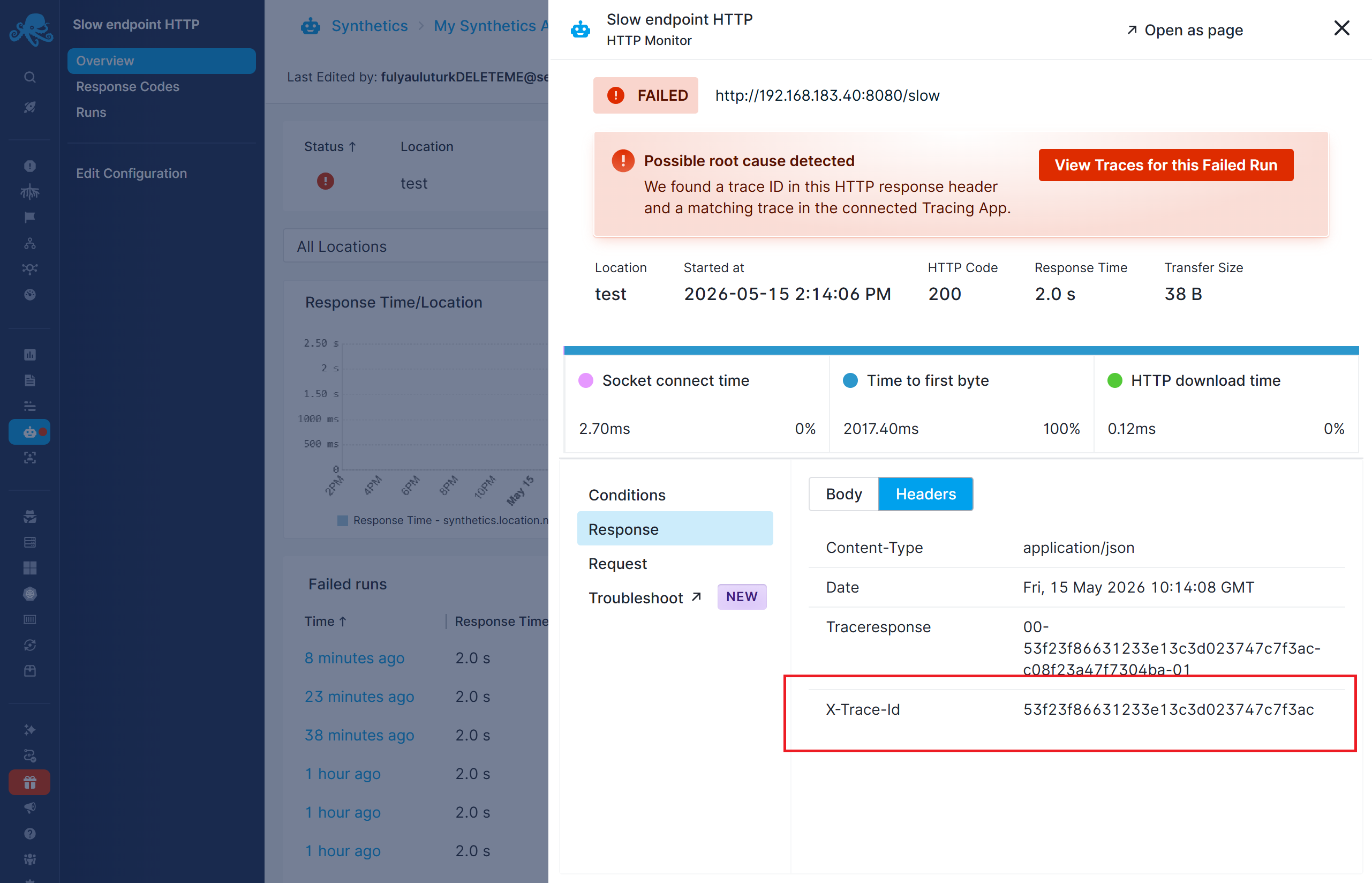
Once Sematext detects the trace ID, the Logs and Traces tabs in the Troubleshoot section will let you drill into the exact logs and the individual trace associated with the failed monitor run. Without trace ID, logs and traces will be filtered by the URL and time window, which could include logs and traces from other requests as well.