Compatibility
Governance requires Sematext Agent 4.6 or later and a Linux host with BPF-LSM enabled.
Host requirements
- Linux kernel 5.17 or later.
- A kernel built with
CONFIG_BPF_LSM=y. bpfincluded in the active Linux Security Module (LSM) list.
Using a recent kernel does not guarantee that the required BPF-LSM is enabled. See below how to check that.
If the requirements are not met, Sematext Agent falls back to observe-only mode. You can still review captured activity and configure alerts, but should not rely on governance policies to enforce restrictions on hosts where BPF-LSM is not enabled.
Containers use the host's Linux kernel. For Kubernetes workloads, check the kernel version and BPF-LSM configuration on each worker node running your AI agents. Any required kernel upgrade or BPF-LSM configuration change must be made on that host or node.
Check compatibility in AI Agent Watch
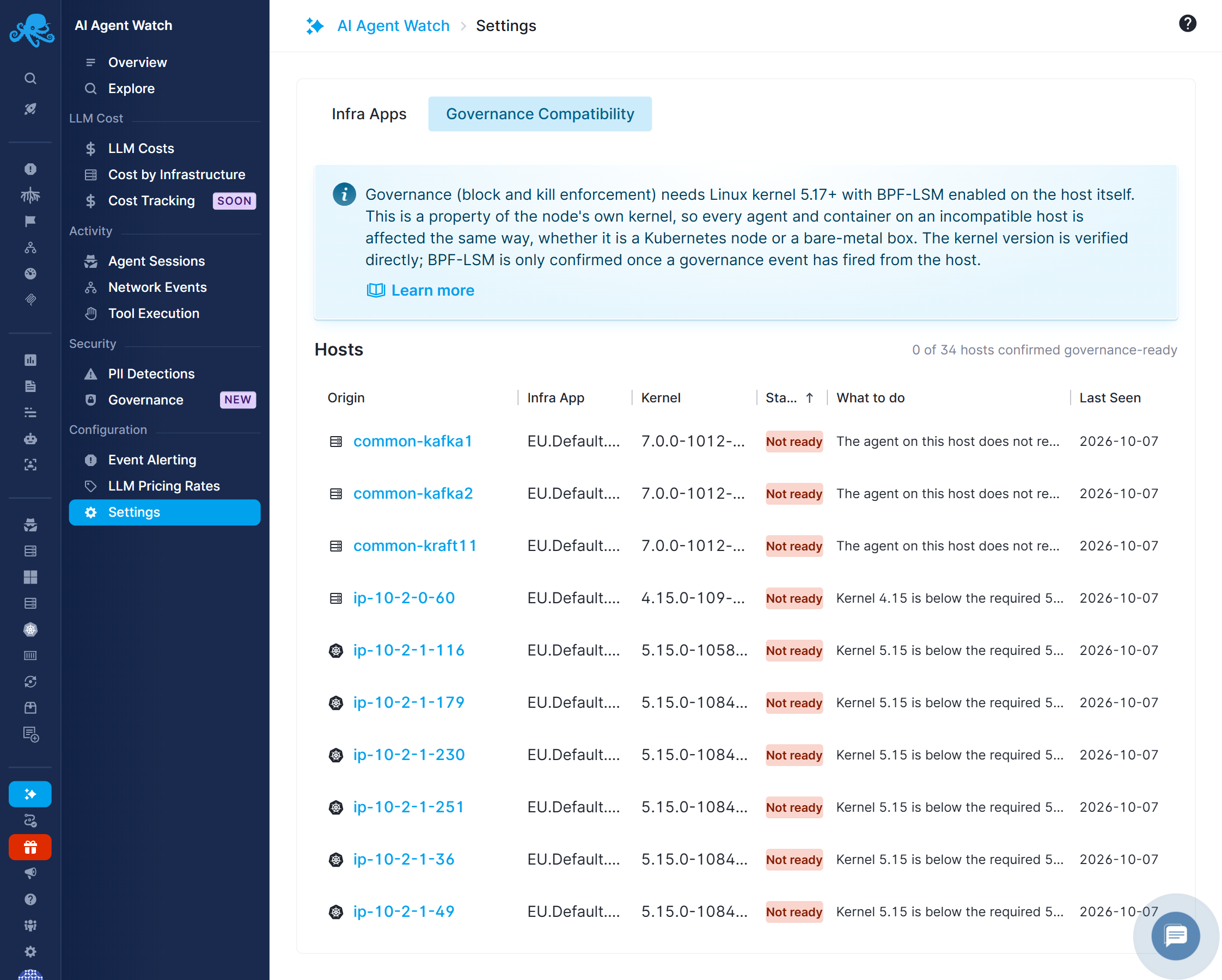
Open Settings → Governance Compatibility. The screen lists each host's Origin, Infra App, Kernel, Status, remediation under What to do, and Last Seen. It also shows how many hosts are confirmed governance-ready. Readiness indicates that the kernel meets the requirement and the host supports governance enforcement.
- READY - The kernel meets the requirement, and the host supports governance enforcement.
- NOT READY: kernel too old - upgrade the host kernel.
- NOT READY: BPF-LSM unconfirmed - the kernel is new enough, but enforcement has not yet been confirmed. Check the kernel configuration and active LSM list below.
Check the host
Run these commands on the monitored Linux host:
The kernel version must meet the requirement, the configuration output must be CONFIG_BPF_LSM=y, and the comma-separated LSM list must contain bpf.
Some distributions expose the kernel configuration through /proc/config.gz instead:
If neither configuration file exists, check your distribution's kernel package configuration. A missing file does not establish that BPF-LSM is disabled. If the active LSM list cannot be read, check permissions and whether securityfs is mounted on the host.
The Linux kernel documents the active LSM list and how BPF programs attach to LSM hooks.
Upgrade the kernel
Install a supported kernel from your distribution that meets the Governance version requirement and includes CONFIG_BPF_LSM=y. If your current distribution cannot provide one, upgrade the distribution or use a supported host image with the required configuration.
Use your distribution's kernel update procedure. For managed Kubernetes nodes, update the node image or node pool through your provider.
Reboot into the updated kernel and run the checks again. Installing a newer kernel does not change the running kernel until the host boots into it.
CONFIG_BPF_LSM is a build-time option. It cannot be enabled by editing a configuration file or loading a module on a running kernel. If it is disabled in your installed kernel, choose a kernel built with support for it.
Enable BPF in the active LSM list
If CONFIG_BPF_LSM=y but bpf is missing from the active list, configure the kernel's lsm= boot parameter to include it. The parameter overrides the kernel's configured LSM list, so preserve the existing security modules and their order. See the official Linux kernel boot parameter reference.
For Ubuntu, see Canonical's guide to modifying kernel boot parameters for bootloader configuration and verification. The guide covers setting boot parameters; use the lsm= value described below to enable BPF-LSM.
Ubuntu or Debian hosts using GRUB
- Read the active list and current boot parameters:
- Edit
/etc/default/grub. Appendlsm=<existing-list>,bpfto the existing value ofGRUB_CMDLINE_LINUX, replacing<existing-list>with the host's LSM list. If anlsm=parameter already exists, update it instead of adding another one. Keep the other boot parameters.
For example, only for a host whose existing list is capability,landlock,lockdown,yama,integrity,apparmor, the appended parameter is:
Use the actual list from your host. Do not replace an SELinux or AppArmor configuration with this example.
- Regenerate the GRUB configuration:
- Reboot the host during an appropriate maintenance window, then verify:
The active list should now include bpf. Ubuntu's AppArmor documentation describes its GRUB configuration and reboot procedure for LSM boot settings. Other bootloaders and managed images have different procedures; use their supported method to set the same kernel parameter.
Verify enforcement
After checking host compatibility, enable a narrowly scoped governance policy on a test host. Use a harmless test target, such as a disposable file denied by an exact-path File Access policy.
Allow up to five minutes for the policy change to take effect. Have a monitored AI agent attempt the matching operation, then check the Governance report for file_access_denied for the matching blocked operation. Check the affected host in Settings → Governance Compatibility as well.
If no event appears, check that the policy is enabled, its scope includes the host and agent, its conditions match the operation, and Sematext Agent is sending data to an Infra App with AI Agent Watch enabled.