Policies
Governance policies block AI agent operations that violate your security requirements, such as accessing credentials, running destructive commands, or connecting to restricted destinations. Each policy defines which operations to block and which AI agents and hosts are affected. Configure them under AI Agent Watch → Event Alerting → Governance Policies. See Governance for enforcement behavior and Governance Compatibility for host requirements.
Governance policies, alert rules, and notifications work independently. An enabled policy blocks matching operations and records governance events even without an alert rule. An enabled alert rule can assign a priority to matching events without sending notifications, so you can review those events later. Notifications are optional and configured separately.
What you can control
Each policy applies to one action type and has at least one condition. The supported match fields are:
| Condition | Meaning | Match kinds | Evaluated in |
|---|---|---|---|
Binary (binary) |
Command or tool name, such as curl. |
Basename, exact, prefix, suffix, contains | Kernel |
Path (path) |
Full executable or file path. | Basename, exact, prefix, suffix, contains | Kernel |
Extension (extension) |
File extension, such as .pem or .env. |
Suffix (fixed) | Kernel |
IP (ip) |
A single destination IP address. | Exact | Kernel |
Port (port) |
A destination port. | Exact | Kernel |
CIDR (cidr) |
A destination IP range, such as 10.0.0.0/8. |
Longest-prefix | Kernel |
Args (args) |
A substring of the command line, such as git push. |
Substring | Kernel |
Destination Host (host) |
The TLS hostname / Server Name Indication (SNI), such as .evil.com or *.evil.com. |
Exact or domain-suffix | Kernel |
The available conditions depend on the policy type: Tool Execution, File Access, or Network Activity. Path matching can target an executable or a file. Command arguments and TLS hostname/SNI are also evaluated in the kernel and used to block the matching operation.
Conditions define which operation to block. Scope defines which agents or hosts the policy applies to. All condition rows must match (AND logic). Comma-separated values within an entry match any listed value (OR logic).
Conditions match the values you specify. For example, an Args condition containing token blocks any command line containing that text. A Destination Host condition blocks matching TLS hostnames; it does not use your Trusted Hosts list.
Text conditions are case-insensitive, except for short command-line flags in Args conditions, which remain case-sensitive. For example, an Extension condition matching .pem also matches .PEM, and a Destination Host condition matching example.com also matches EXAMPLE.COM. Short flags such as -r and -R are treated as distinct options.
Scope a policy
Use scope to restrict a policy to particular hosts, workloads, agent types, or trust status:
| Scope field | Supported operators |
|---|---|
Host Name (hostName) |
is, is_not, in, not_in, starts_with, ends_with, contains |
Pod Name (podName) |
is, is_not, in, not_in, starts_with, contains |
Cluster (cluster), Namespace (namespace), Agent Type (agentType) |
is, is_not, in, not_in |
Is Trusted Agent (isTrustedAgent) |
is, is_not |
All scope entries must match (AND logic). Comma-separated values match any listed value (OR logic). Trust status is a boolean: use is false to target untrusted agents. in and not_in are not supported for this field.
Text scope values are case-insensitive. For example, an Agent Type scope of is Codex also matches codex, and a Host Name scope of starts_with ci- also matches host names beginning with CI-.
With no scope entries, the policy applies to every tracked agent in the account. A hostname scope of starts_with ci-, for example, applies across CI hosts sharing that prefix.
Create a governance policy
- Open AI Agent Watch → Event Alerting → Governance Policies.
- Click Add Policy and choose Tool Execution, File Access, or Network Activity.
- Enter a policy name and add at least one condition defining the operation to block.
- Set the Scope to limit which agents and hosts the policy applies to. Choose the fields and operators from the scope table. With no scope, the policy applies to every tracked agent in the account.
- Optionally, in the Alert Rules section, click Create Alert Rule to create a rule for this policy's enforcement event type. The alert rule assigns a priority to matching events and can send notifications when enabled with notifications and recipients configured. It can also match events from other policies with the same event type. See Get notified when a policy matches for details.
- Click Save Policy and enable the policy when you are ready to enforce it.
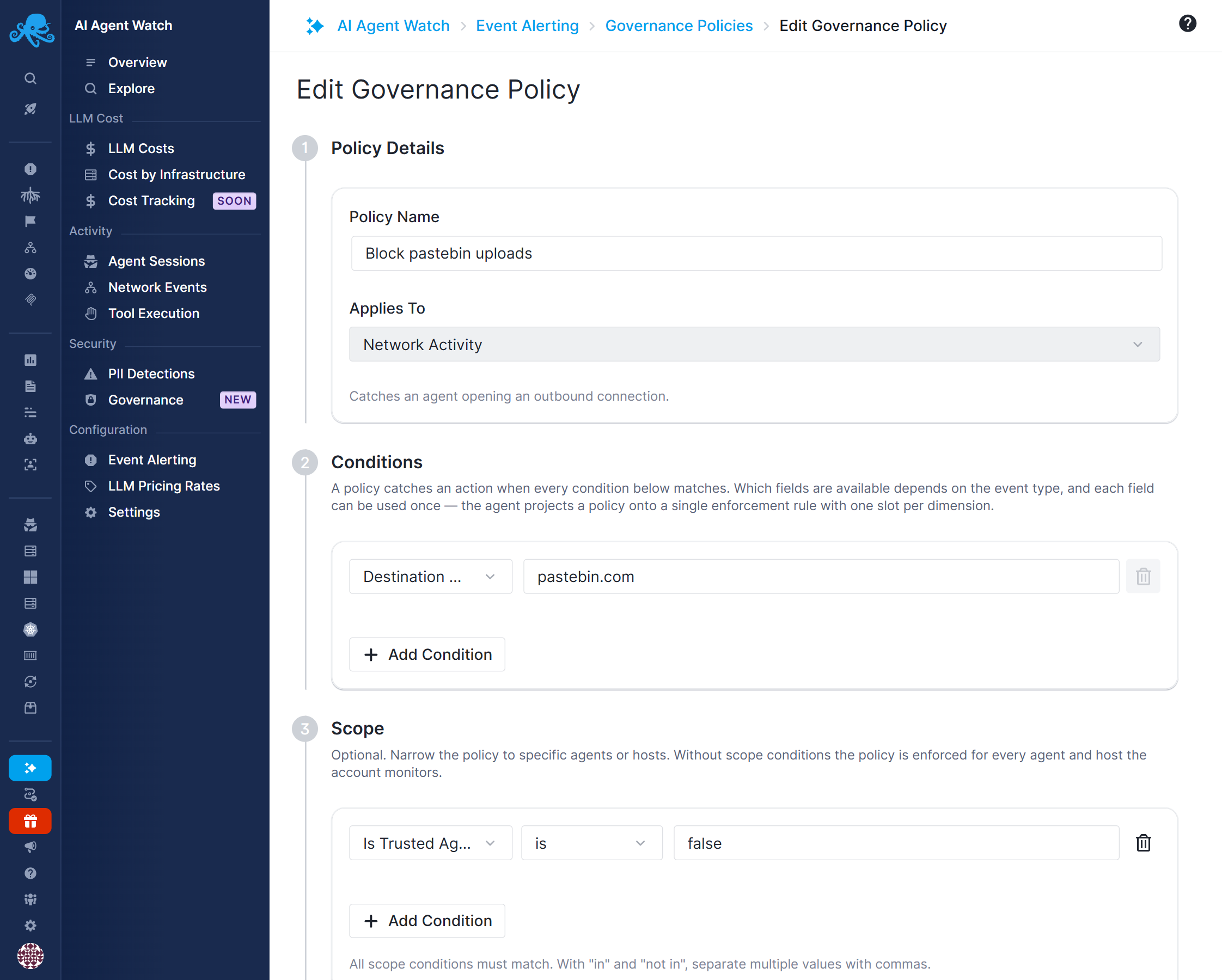
Blocked operations are recorded as events even if you do not create an alert rule. You can review existing rules in the policy editor and manage them later from the Alert Rules tab.
Policy changes can take up to five minutes to take effect. Start with a specific host or workload, check the resulting events, and expand the scope after verifying the policy matches the intended activity.
For example, to deny access to the Docker socket on a particular host, create a File Access policy with Path is /var/run/docker.sock and Host Name is worker-01. The policy emits file_access_denied when it denies a matching operation.
Default example policies
AI Agent Watch provides 16 default policies as configuration examples. All are disabled by default. They do not block any activity until you enable them. Review each policy's conditions and set its scope before enabling it.
Each row below is a separate policy, so you can enable or customize one without enabling the others.
| Policy | Condition | Event type |
|---|---|---|
| Block Credential File Access (.pem) | Extension ends with .pem |
file_access_denied |
| Block Credential File Access (.key) | Extension ends with .key |
file_access_denied |
| Block Credential File Access (.p12) | Extension ends with .p12 |
file_access_denied |
| Block Credential File Access (.pfx) | Extension ends with .pfx |
file_access_denied |
| Block Credential File Access (.env) | Extension ends with .env |
file_access_denied |
| Block Credential-Bearing Command (password) | Args contains password |
exec_denied |
| Block Credential-Bearing Command (secret) | Args contains secret |
exec_denied |
| Block Credential-Bearing Command (token) | Args contains token |
exec_denied |
| Prevent Dangerous Shell Command (rm -rf /) | Args contains rm -rf / |
exec_denied |
| Prevent Dangerous Shell Command (mkfs) | Args contains mkfs |
exec_denied |
| Prevent Dangerous Shell Command (dd if=) | Args contains dd if= |
exec_denied |
| Block Outbound Connections to 10.0.0.0/8 | CIDR matches 10.0.0.0/8 |
net_denied |
| Block Outbound Connections to 172.16.0.0/12 | CIDR matches 172.16.0.0/12 |
net_denied |
| Block Outbound Connections to 192.168.0.0/16 | CIDR matches 192.168.0.0/16 |
net_denied |
| Block Access to Docker Socket | Path is /var/run/docker.sock |
file_access_denied |
| Block Data-Exfiltration Host | TLS hostname/SNI matches domain suffix .exfil-drop.net |
net_denied |
The credential-file examples cover only the listed suffixes. Add policies for other sensitive paths or extensions. The command examples match substrings, so they can also match legitimate commands containing those strings. The private-network examples can block connections to internal APIs and databases. Replace the sample domain suffix with destinations you want to restrict.
Examples of scoped policies
| Policy | Conditions | Scope | Effect |
|---|---|---|---|
| Block Docker socket in production | Path is /var/run/docker.sock |
Namespace in prod-api,prod-workers |
Denies opening the socket in the listed production namespaces. |
| Keep untrusted agents off a private network | CIDR is 10.0.0.0/8 |
Is Trusted Agent is false |
Blocks connections to that network for untrusted agents; trusted agents are unaffected. |
| Deny force pushes from Codex | Binary git (basename) AND Args push --force |
Agent Type is Codex |
Denies the matching Git command from Codex; other agent types are unaffected. |
| Protect private keys on CI hosts | Extension ends_with .pem |
Host Name starts_with ci- |
Blocks opening, deleting, renaming, and truncating matching files on CI hosts. |
| Restrict paste sites for untrusted agents | Host pastebin.com |
Is Trusted Agent is false |
Blocks the matching ClientHello write so its data does not leave the host. |
| Deny access to env files for one workload | Path contains .env |
Pod Name starts_with checkout-api- |
Applies across pods whose generated names share that prefix. |
| Block curl for selected agents in a cluster | Binary curl (basename) |
Cluster is eu-prod AND Agent Type in Claude Code,Codex |
Both scope entries must match. |
| Block netcat across all tracked agents | Binary nc (basename) |
None | Denies matching execution across the account's tracked agents. |
Get notified when a policy matches
Use an alert rule to notify you when a governance event is received.
- In the governance policy editor, use the Alert Rules section to create an alert rule or review an existing one. You can also create the rule directly from the Alert Rules tab.
- Select the event type:
exec_denied,file_access_denied, ornet_denied. - Set the priority. An alert rule created from a governance policy defaults to High.
- Add host, cluster, namespace, or agent conditions if you want to narrow which events trigger the alert.
- Enable the alert rule, turn on notifications, and configure at least one email recipient or notification hook.
For example, a rule matching file_access_denied with no additional conditions alerts on all governance file-access events. It can match events from both the credential-file policy and the Docker-socket policy. Creating it from a governance policy does not restrict it to that policy alone.
Notifications follow the same scheduling and throttling behavior as other AI Agent Watch alerts. An enabled governance policy continues enforcing even if its alert rule is disabled or notifications are turned off. Event priority and risk scoring follow the matching alert rules and risk-score rules.